Smoking fast Haskell code using GHC’s new LLVM codegen


In this post we’ll play with GHC’s new LLVM code generator backend, and see how much faster some Haskell programs are when compiled with LLVM instead of GCC.

For the kind of loops we get from stream fusion, the -fllvm backend produced a lot better code, up to 3x faster in some cases. There are pretty graphs, and some smoking hot new technology.

Overview

This week David Terei announced that his work on an LLVM code generator backend for the Glasgow Haskell Compiler was ready to try out. Initial reports from his undergraduate thesis held that the LLVM code generator was competitive with the current GHC native code generator, a bit slower than the C backend in general (which uses GCC for code generation), but, tantalisingly, should produce big speedups for particular Haskell programs. In particular, tight loops of the kind generated by the bytestring, vector, data parallel arrays or text libraries. David reported speedups of 25% over the previous best performance we’d got from GHC for data parallel code.

I was very keen to try it out on the vector library — a fast, fusible numerical arrays package (similar to NumPy), which generates some very tight loops. Under the C backend, GCC has been failing to spot that the code GHC generates were actually loops, and this lead to GCC optimizing the generated code pretty badly. The native code generator does ok, but doesn’t have a lot of the clever low-level optimizations we need for really good bare metal performance.

So how would the new LLVM backend do?

Setting up

To try out the LLVM backend I followed the instructions on the wiki.

  • Check out GHC HEAD from darcs.
  • Apply the LLVM patch.
  • Check out LLVM from svn
  • Apply the GHC patch
  • Build your GHC.

This worked out of the box, and I now have a GHC 6.13 with the -fllvm flag.

$ ghc --info
 [("Project name","The Glorious Glasgow Haskell Compilation System")
 ,("Project version","6.13.20100221")
 ,("Booter version","6.12.1")
 ,("Stage","2")
 ,("Have interpreter","YES")
 ,("Object splitting","YES")
 ,("Have native code generator","YES")
 ,("Have llvm code generator","YES")
 ,("Support SMP","YES")
 ,("Unregisterised","NO")
 ,("Tables next to code","NO")
 ,("Win32 DLLs","")
 ,("RTS ways","l debug  thr thr_debug thr_l  ")
 ,("Leading underscore","NO")
 ,("Debug on","False")
 ,("LibDir","/home/dons/lib/ghc-6.13.20100221")
 ]

Running on a dual core Core 2 laptop:

$ uname -msr
 Linux 2.6.32-ARCH x86_64

You can then install packages as normal, via cabal, and add the -fllvm flag to see GHC build things via the new backend:

$ cabal install primitive --ghc-options=-fllvm

The packages I’m interested in are:

And some helper code in:

I also modifed the ghc-core tool to support showing the LLVM generated assembly.

Warm up lap

Let’s check the backend is working (remember to add the -fllvm flag):

$ ghc -O2 --make A.hs -fllvm -fforce-recomp
[1 of 1] Compiling Main             ( A.hs, A.o )
Linking A ...
$ time ./A
"hey"
./A  0.00s user 0.00s system 61% cpu 0.005 total

Good! The LLVM backend is generating working code for x86_64/Linux. Now, something more ambitious … a program from the shootout.

A shootout program

So let’s find some code that’s already been optimized. I’l compile the pidgits shootout benchmarks (where Haskell’s already the fastest entry).

First, with the native code gen:

$ ghc -O2 -fasm A.hs –make -fforce-recomp

$ time ./A 10000 > /dev/null
./A 10000 > /dev/null 3.19s user 0.03s system 91% cpu 3.509 total

With the old GCC backend:

$ ghc -O2 -fvia-C -optc-O3 A.hs –make -fforce-recomp

$ time ./A 10000 > /dev/null
./A 10000 > /dev/null 2.89s user 0.03s system 97% cpu 2.988 total

And with the -fllvm backend:

$ ghc -O2 -fllvm A.hs –make -fforce-recomp

$ time ./A 10000 > /dev/null
./A 10000 > /dev/null 2.86s user 0.02s system 98% cpu 2.936 total

Woo. It runs, and we get a speedup! Now for some serious business.

The Vector Package

Vector is a Haskell library for working with arrays. It provides several array types (boxed, unboxed, C), with a rich interface similar to the lists library, and some functions reminiscent of Data Parallel Haskell. There’s a tutorial on how to use it.

The interface is built entirely around stream fusion combinators — a general form of classic loop fusion made possible by purity. When you do multiple passes over the data (e.g. sum/map/fold/filter/…) the compiler will common up the loops, and discard intermediate arrays, making the code potentially very fast.

The loops that are generated tend to be very register heavy, do no heap allocation, and benefit from clever imperative loop optimizations. Unfortunately, the GCC backend to GHC doesn’t spot that these are actually loops, so doesn’t get to fire many optimizations.

The promise of the LLVM backend is that it will recognize the loops GHC generates from fused code. Let’s see how it performs.

To benchmark these programs, I’ll use the criterion and progression benchmarking libraries. (I had to build the darcs version of gtk2hs, and compiler data accessor-template with the -ftemplate_2_4 flag)

Simple loops

To start off, let’s generate 1 billion ints, sum them, print the result. That should tell us if our loops are efficient:

import qualified Data.Vector as U
main = print . U.sum $ U.enumFromTo 1 (1000000000 :: Int)

There are two loops in this program. enumFromTo and sum.

The core

GHC compiles these two loops into a single loop, when compiled with -O2 or -Odph:

loop  :: Int# -> Int# -> Int#
loop x y =
     case <=# y 1000000000 of
         False -> x
         True  ->  loop (x +# y) (y +# 1)

This is perfect. We write “sum (enumFromTo 1 n)” and we get a non-allocating loop.

The native backend

GHC 6.13 with the native code generator generates the following assembly for the inner loop:

Main_mainzuzdszdwfoldlMzqzuloop_entry:
 .Lc21u:
 cmpq $1000000000,%rsi
 jle .Lc21x
 movq %r14,%rbx
 movq (%rbp),%rax
 jmp *(%rax)
 .Lc21x:
 addq %rsi,%r14
 incq %rsi
 jmp Main_mainzuzdszdwfoldlMzqzuloop_entry

which runs in:

$ time ./enum
 500000000500000000
 ./enum  1.00s user 0.00s system 99% cpu 1.008 total

The  C backend

GHC 6.12.1 with the C backend, (-fvia-C -optc-O3) (I’m having trouble linking programs with the C backend and GHC 6.13), yields a pretty small loop:

Main_mainzuzdszdwfoldlMzqzuloop_info:
 cmpq    $1000000000, %r14
 movq    %r14, %rax
 jle     .L2
 movq    %rsi, %rbx
 jmp     *(%rbp)
 .L2:
 leaq    1(%r14), %r14
 addq    %rax, %rsi
 jmp     Main_mainzuzdszdwfoldlMzqzuloop_info

Which runs slower than the native code generator:

$ time ./enum
 500000000500000000
 ./enum  1.09s user 0.00s system 99% cpu 1.100 total

The LLVM backend

With -O2 -fllvm we get very different code, and it is a bit harder to work out what is going on. LLVM transforms the code far more aggressively.

.LBB1_2:
 leaq    1(%rsi), %rax
 addq    %rsi, %r14
 cmpq    $1000000001, %rax
 jge     .LBB1_5                 # loop exit
 addq    $2, %rsi
 addq    %rax, %r14
 .LBB1_1:                        # %tailrecurse
 cmpq    $1000000001, %rsi
 jl      .LBB1_2

And the proof is in the pudding:

$ time ./enum
 500000000500000000
 ./enum  0.48s user 0.01s system 99% cpu 0.488 total

This is the fastest Haskell we’ve ever generated for this little benchmark (at least without manual loop unrolling)!

The LLVM backend more than halved the running time for this simple loop. But remember: general benchmarks aren’t seeing these kind of speedups — LLVM is really excelling itself at the tight numeric code.

Here’s the data presented in a slightly different form, with criterion and progression. The numbers are slightly different, since we won’t inline the length of the vector argument, and we’re wrapping the code in benchmarking wrappers. I wasn’t able to get -fvia-C programs to link under the HEAD, so we’ll exclude those from graphs, but report them in text form.

With the -fasm backend:

With the LLVM backend:
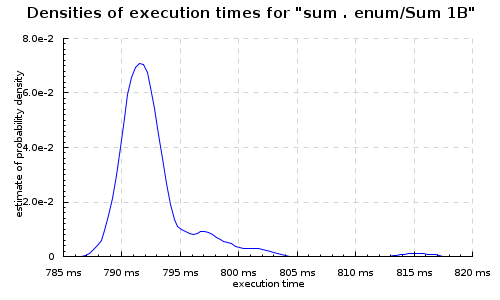
Or side-by-side with the progression package:

The -fasm backend under the progression tool ran around ~1s for each billion ints, while -fllvm was around 0.8s. Note that we get slightly different timings with the loops under each benchmarking tool, due to how the benchmark program and wrapper are optimized.

Zips

Zips are another good candidate, since they turn into nested loops. So, e.g.

import qualified Data.Vector as U
import Data.Bits
main = print . U.sum . U.map (`shiftL` 1) $ U.zipWith (*)
                        (U.enumFromTo 1 (100000000 :: Int))
                        (U.replicate (100000000 :: Int) 42)

Which fuses to this set of loops:

loop  :: Int# -> Int# -> Int# -> Int#
loop =
  \ (sc_s29b :: Int#)
    (sc1_s29c :: Int#)
    (sc2_s29d :: Int#) ->
    case <=# sc1_s29c 100000000 of _ {       False -> sc_s29b;
      True ->
        case <=# sc2_s29d 0 of _ {           False ->
            loop
              (+#
                 sc_s29b (uncheckedIShiftL# (*# sc1_s29c 42) 1))
              (+# sc1_s29c 1)
              (-# sc2_s29d 1);
          True -> sc_s29b
        }
    }

Which, again, is perfect Core. All those functions combined into a single non-allocating loop.

-fasm:

Main_mainzuzdszdwfoldlMzqzuloop_entry:
.Lc2aC:
        cmpq $100000000,%rsi
        jle .Lc2aE
        movq %r14,%rbx
        movq (%rbp),%rax
        jmp *(%rax)
.Lc2aE:
        testq %rdi,%rdi
        jle .Lc2aH
        movq %rsi,%rax
        imulq $42,%rax
        shlq $1,%rax
        addq %rax,%r14
        incq %rsi
        decq %rdi
        jmp Main_mainzuzdszdwfoldlMzqzuloop_entry
.Lc2aH:
        movq %r14,%rbx
        movq (%rbp),%rax
        jmp *(%rax)

Which is reasonable:

$ time ./zipwith
420000004200000000
./zipwith 0.24s user 0.00s system 99% cpu 0.246 total

With the -fvia-C -optc-O3 backend, just the inner loop, since that’s easy to read:

Main_mainzuzdszdwfoldlMzqzuloop_info:
        cmpq    $100000000, %rsi
        jg      .L6
.L2:
        testq   %r14, %r14
        jle     .L6
        leaq    (%rsi,%rsi,4), %rcx
        leaq    -1(%r14), %r14
        leaq    (%rsi,%rcx,4), %rcx
        leaq    1(%rsi), %rsi
        leaq    (%rdi,%rcx,4), %rdi
        jmp     Main_mainzuzdszdwfoldlMzqzuloop_info

Which runs in about the same time as the -fasm backend:

$ time ./zipwith
420000004200000000
./zipwith  0.25s user 0.00s system 99% cpu 0.251 total

With -fllvm the code is wildly different, and I find it pretty hard to reconstruct what transformatoins LLVM has done.

Main_mainzuzdszdwfoldlMzqzuloop_entry:
# BB#0:                                 # %c2cf
        subq    $8, %rsp
        imulq   $84, %rsi, %rax
        jmp     .LBB1_1
.LBB1_3:                                # %n2cN
                                        #   in Loop: Header=BB1_1 Depth=1
        incq    %rsi
        decq    %rdi
        addq    %rax, %r14
        addq    $84, %rax
.LBB1_1:                                # %tailrecurse
                                        # =>This Inner Loop Header: Depth=1
        cmpq    $100000001, %rsi        # imm = 0x5F5E101
        jge     .LBB1_4
                                        #   in Loop: Header=BB1_1 Depth=1
        testq   %rdi, %rdi
        jg      .LBB1_3
.LBB1_4:                                # %n2ck
        movq    (%rbp), %rax
        movq    %r14, %rbx
        movq    (%rax), %r11
        addq    $8, %rsp
        jmpq    *%r11  # TAILCALL

The “inner loop” is interesting. Nothing like what -fasm or -fvia-C generate. And it’s way faster:

$ time ./zipwith
420000004200000000
./zipwith 0.15s user 0.00s system 99% cpu 0.154 total

So yeah, 40% faster!

Criterion

Here, under criterion (same code, but different values of n), With the -fasm backend, mean execution time 186ms:
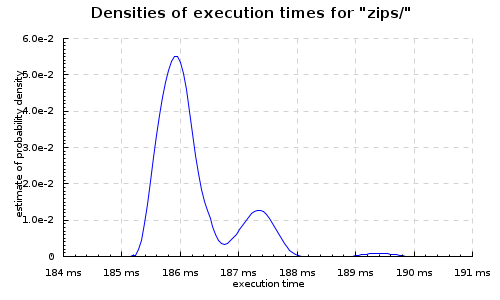
With the -fllvm backend, 135 ms  (27% improvement):

zipwith3

Heavily nested zips are probably the best cases for LLVM, and we see the -fllvm backend do some pretty wild stuff with this:

import qualified Data.Vector.Unboxed as U import Data.Bits main = print . U.sum $ U.zipWith3 (\x y z -> x * y * z) (U.enumFromTo 1 (100000000 :: Int)) (U.enumFromTo 2 (100000001 :: Int)) (U.enumFromTo 7 (100000008 :: Int))

Which fuses to:

main_$s$wfoldlM'_loop [Occ=LoopBreaker]
  :: Int#     -> Int# -> Int# -> Int# -> Int#

main_$s$wfoldlM'_loop =
  \ (sc_s2jh :: Int#)
    (sc1_s2ji :: Int#)
    (sc2_s2jj :: Int#)
    (sc3_s2jk :: Int#) ->
    case  sc_s2jh;
      True ->
        case  sc_s2jh;
          True ->
            case  sc_s2jh;
              True ->
                main_$s$wfoldlM'_loop
                  (+#
                     sc_s2jh (*# (*# sc1_s2ji sc2_s2jj) sc3_s2jk))
                  (+# sc1_s2ji 1)
                  (+# sc2_s2jj 1)
                  (+# sc3_s2jk 1)
            }
        }
    }

Great core. With the -fasm backend:

Main_mainzuzdszdwfoldlMzqzuloop_entry:
.Lc2lq:
        cmpq $100000000,%rsi
        jle .Lc2ls
        movq %r14,%rbx
        movq (%rbp),%rax
        jmp *(%rax)
.Lc2ls:
        cmpq $100000001,%rdi
        jle .Lc2lu
        movq %r14,%rbx
        movq (%rbp),%rax
        jmp *(%rax)
.Lc2lu:
        cmpq $100000008,%r8
        jle .Lc2lx
        movq %r14,%rbx
        movq (%rbp),%rax
        jmp *(%rax)
.Lc2lx:
        movq %rdi,%rax
        imulq %r8,%rax
        movq %rsi,%rcx
        imulq %rax,%rcx
        addq %rcx,%r14
        incq %rsi
        incq %rdi
        incq %r8
        jmp Main_mainzuzdszdwfoldlMzqzuloop_entry

Straight forward, and running it:

$ time ./zipwith3
3541230156834269568
./zipwith3  0.47s user 0.01s system 98% cpu 0.484 total

With -fvia-C -optc-O3:

Main_mainzuzdszdwfoldlMzqzuloop_info:
        .text
        .p2align 4,,15
.text
        .align 8
        .type Main_mainzuzdszdwfoldlMzqzuloop_info, @function
# 38 "/tmp/ghc10013_0/ghc10013_0.hc" 1
# 0 "" 2
        cmpq    $100000000, %rdi
        jg      .L9
.L4:
        cmpq    $100000001, %rsi
        jg      .L9
.L5:
        cmpq    $100000008, %r14
        .p2align 4,,5
        jg      .L9
.L7:
        movq    %rsi, %r10
        leaq    1(%rsi), %rsi
        imulq   %rdi, %r10
        leaq    1(%rdi), %rdi
        imulq   %r14, %r10
        leaq    1(%r14), %r14
        leaq    (%r10,%r8), %r8
        jmp     Main_mainzuzdszdwfoldlMzqzuloop_info

And we get a faster result:

$ time ./zipwith3
3541230156834269568
./zipwith3  0.34s user 0.00s system 99% cpu 0.344 total

-fllvm, looks like some heavy loop unrolling:

Main_mainzuzdszdwfoldlMzqzuloop_entry:  # @Main_mainzuzdszdwfoldlMzqzuloop_entry
# BB#0:                                 # %c2oz
        subq    $56, %rsp
        cmpq    $100000002, %rdi        # imm = 0x5F5E102
        movl    $100000002, %eax        # imm = 0x5F5E102
        movq    $-2, %rdx
        movq    %r9, 40(%rsp)           # 8-byte Spill
        movq    %r15, 48(%rsp)          # 8-byte Spill
        movq    $-3, %r9
        movq    %r12, 32(%rsp)          # 8-byte Spill
        movq    %r8, %rbx
        movq    %r13, 24(%rsp)          # 8-byte Spill
        movq    %r14, 16(%rsp)          # 8-byte Spill
        leaq    1(%rdi), %r13
        cmovgq  %rdi, %rax
        negq    %rax
        leaq    -1(%rdi,%rax), %rcx
        cmpq    $100000009, %r8         # imm = 0x5F5E109
        movl    $100000009, %eax        # imm = 0x5F5E109
        cmovgq  %r8, %rax
        negq    %rax
        leaq    -1(%r8,%rax), %rax
        cmpq    %rcx, %rax
        cmovaq  %rax, %rcx
        cmpq    $100000001, %rsi        # imm = 0x5F5E101
        movl    $100000001, %eax        # imm = 0x5F5E101
        cmovgq  %rsi, %rax
        negq    %rax
        leaq    -1(%rsi,%rax), %rax
        cmpq    %rax, %rcx
        cmovbeq %rax, %rcx
        imulq   %rdi, %rbx
        imulq   %rsi, %r13
        movq    %rcx, %r10
        subq    %rcx, %rdx
        subq    %rcx, %r9
        imulq   %rsi, %rbx
        addq    %rdi, %r13
        notq    %r10
        movq    %r10, %rax
        imulq   %r10, %rbx
        mulq    %rdx
        addq    16(%rsp), %rbx          # 8-byte Folded Reload
        movq    %rax, %r11
        movq    %rdx, %r15
        movq    %r15, %r12
        movq    %r11, %rax
        andq    $1, %r15
        imulq   %r9, %r12
        mulq    %r9
        shldq   $63, %r11, %r15
        leaq    (%r8,%rdi), %r9
        addq    %rdx, %r12
        movq    $-4, %rdx
        addq    %rsi, %r9
        subq    %rcx, %rdx
        movq    %r12, %r14
        andq    $1, %r12
        leaq    6(%r9,%r9), %r10
        movabsq $6148914691236517205, %r9 # imm = 0x5555555555555555
        movq    %rdx, 8(%rsp)           # 8-byte Spill
        imulq   %rdx, %r14
        leaq    1(%rdi,%rsi), %rdx
        shldq   $63, %rax, %r12
        imulq   %r8, %rdx
        imulq   %r12, %r10
        leaq    1(%rdx,%r13), %rdx
        imulq   %r10, %r9
        imulq   %r15, %rdx
        addq    %rdx, %rbx
        mulq    8(%rsp)                 # 8-byte Folded Reload
        subq    %r9, %rbx
        movq    %r8, %r9
        decq    %r8
        subq    %rcx, %r9
        addq    %rdx, %r14
        movq    %rdi, %rdx
        decq    %r9
        shldq   $62, %rax, %r14
        movq    %rsi, %rax
        subq    %rcx, %rdx
        andq    $-2, %r14
        subq    %rcx, %rax
        decq    %rdx
        addq    %rbx, %r14
        decq    %rax
        .align 16
.LBB2_1:                                # %tailrecurse
                                        # =>This Inner Loop Header: Depth=1
        cmpq    $100000001, %rsi        # imm = 0x5F5E101
        jge     .LBB2_4
# BB#2:                                 # %c2oD
                                        #   in Loop: Header=BB2_1 Depth=1
        cmpq    $100000002, %rdi        # imm = 0x5F5E102
        jge     .LBB2_4
# BB#3:                                 # %c2p5
                                        #   in Loop: Header=BB2_1 Depth=1
        incq    %rsi
        incq    %rdi
        incq    %r8
        cmpq    $100000009, %r8         # imm = 0x5F5E109
        jl      .LBB2_1
.LBB2_4:                                # %n2oE
        movq    (%rbp), %rcx
        movq    %r9, %r8
        movq    24(%rsp), %r13          # 8-byte Reload
        movq    32(%rsp), %r12          # 8-byte Reload
        movq    %r14, %rbx
        movq    %rax, %rsi
        movq    %rdx, %rdi
        movq    40(%rsp), %r9           # 8-byte Reload
        movq    48(%rsp), %r15          # 8-byte Reload
        movq    (%rcx), %r11
        addq    $56, %rsp
        jmpq    *%r11  # TAILCALL

And blows them all out of the water! 3x faster than -fasm! Twice as fast as -fvia-C -optc-O3.

$ time ./zipwith3
3541230156834269568
./zipwith3  0.16s user 0.00s system 99% cpu 0.158 total

From the Statistics package

The statistics package has some more “realistic” microbenchmarks. Let’s look at those. First, computing the mean of a large array of doubles (here all set to ‘pi’).

main = print (mean (V.replicate 1000000000 (pi :: Double)))

With the -fasm backend:

Main_mainzuzdszdwfoldlMzuloop_entry:
.Lc2b2:
        testq %rsi,%rsi
        jle .Lc2b5
        cvtsi2sdq %r14,%xmm0
        movsd .Ln2b8(%rip),%xmm7
        subsd %xmm5,%xmm7
        divsd %xmm0,%xmm7
        addsd %xmm7,%xmm5
        incq %r14
        decq %rsi
        jmp Main_mainzuzdszdwfoldlMzuloop_entry

Simple, easy.

$ time ./mean
3.141592653589793
./mean  5.58s user 0.01s system 99% cpu 5.599 total

With the -fllvm backend:

Main_mainzuzdszdwfoldlMzuloop_entry:    # @Main_mainzuzdszdwfoldlMzuloop_entry
# BB#0:                                 # %c28E
        subq    $8, %rsp
        movsd   .LCPI3_0(%rip), %xmm0
        jmp     .LBB3_1
        .align 16
.LBB3_3:                                # %n28K.i
                                        #   in Loop: Header=BB3_1 Depth=1
        movapd  %xmm0, %xmm5
        cvtsi2sdq       %rcx, %xmm8
        addq    $-2, %rsi
        addq    $2, %r14
        subsd   %xmm7, %xmm5
        divsd   %xmm8, %xmm5
        addsd   %xmm7, %xmm5
.LBB3_1:                                # %tailrecurse
                                        # =>This Inner Loop Header: Depth=1
        testq   %rsi, %rsi
        jle     .LBB3_5
# BB#2:                                 # %n28K
                                        #   in Loop: Header=BB3_1 Depth=1
        movapd  %xmm0, %xmm7
        cvtsi2sdq       %r14, %xmm8
        leaq    -1(%rsi), %rax
        leaq    1(%r14), %rcx
        subsd   %xmm5, %xmm7
        testq   %rax, %rax
        divsd   %xmm8, %xmm7
        addsd   %xmm5, %xmm7
        jg      .LBB3_3
# BB#4:                                 # %c28J.i
        movq    (%rbp), %rdx
        movq    %rcx, %rbx
        movq    %rcx, %r14
        movq    %rax, %rsi
        movapd  %xmm7, %xmm5
        movq    (%rdx), %r11
        addq    $8, %rsp
        jmpq    *%r11  # TAILCALL
.LBB3_5:                                # %c28J
        movq    (%rbp), %rax
        movq    %r14, %rbx
        movq    (%rax), %r11
        addq    $8, %rsp
        jmpq    *%r11  # TAILCALL

And running it:

$ time ./mean
3.141592653589793
./mean  5.55s user 0.01s system 99% cpu 5.585 total

Some pretty wacky code, but a little faster.

Conclusions

The LLVM backend seems to be holding up to what we hoped: it does a better (some times much better) job on tight loops. We get better code than GHC has ever produced before. It seems pretty robust, so far everything I’ve tried has worked.

David’s benchmarks indicate that with the current — first attempt — at an LLVM backend most large programs aren’t noticeably faster, but I think the promise we see in these small examples justifies spending more time working on the LLVM backend to GHC. It has much more potential than the GCC backend.

Currently we’re not experimenting with the LLVM optimization layer at all — I think there’s likely to be a lot of win just tweaking those settings (and exposing them to the Haskell programmer via GHC flags).

Evolving faster Haskell programs

This post is about using a genetic algorithm (GA) search technique to search for faster Haskell programs. We’ll use the GA to automatically evolve better:

and briefly consider automatic optimizing for:

So this is about how to make your already-fast Haskell programs faster without doing the hard work yourself. I’ll walk through the approach of using a GA library to breed solutions, and show performance improvements in already hand-optimized programs submitted to the Computer Language Benchmarks Game found by a GA search.

As a taste, the GA found an inlining hint combination resulting in an 18% reduction in runtime for the parallel k-nucleotide benchmark (a program that had already had extensive hand optimization!). Sweet.

Background

A modern optimizing compiler like GHC is a complex beast, with a barrage of optimizations available to transform code from lambda calculus to assembly. GHC follows a compilation-by-transformation approach, doing as much as possible of its code improvement via “correctness-preserving, and hopefully performance-improving, program transformations”. Deciding when to perform some particular transformation is hard, so instead the compiler has many, many tunable flags, as well as allowing hints in the source in the form of pragmas to let the programmer make domain-specific optimizations that may not be generally applicable.

Since the compiler doesn’t always get the thresholds for optimization right, exposing, for example, inlining hints to the programmer can have significant benefits when the programmer knows something more about how the code is to be used. I’ve seen factors of 10x to 100x performance improvements in inner loops with careful overriding of the default inliner heuristics used by the “Illustrious Inliner” (in Data.Binary)

The problem is the complexity of it all. If we have n inlinable functions or compiler flags, there’s 2^n combinations of inlining suggestions we can give to the compiler (double that if we start disabling inlining, and even more if we start setting particular phases). Even if the programmer has a few heursitics in mind to help with pruning, the search space is still huge. For these reasons, it is hard to know precisely when a particular flag, option, or inlining hint will be of benefit (and the same goes for parallelism hints, and strictness hints).

So, let’s have the computer traverse the search space for us.

Acovea

With a large search space for our optimization problem, one classic technique is to use an evolutionary algorithm to minimize for some cost. And for breeding the best set of compiler flags for a given program, we can use an off-the-shelf solution: acovea

ACOVEA (Analysis of Compiler Options via Evolutionary Algorithm) implements a genetic algorithm to find the “best” options for compiling programs with the GNU Compiler Collection (GCC) C and C++ compilers

Given a specification of the available flags, acovea uses these as variables to fill out an optimization search space, which it then traverses, using GA techniques to hang on to useful flags, breeding them to find a semi-optimal combination.acovea is relatively simple to use:

  1. Compile the C++ libs (libevocosm, libcoyotl and libacovea)
  2. Develop a specification of the flags to tune for your compiler (or reuse the defaults for GCC)
  3. Then launch the “runacovea” wrapper script on your program
  4. Go away for a few hours

Come back and you’ll be presented with suggested optimistic and pessimistic flags, best flag combinations, generally good combinations, and measurements against any baselines you set up. I’ve used acovea in the past (for optimising the GCC flags used in a polymer chemistry simulation) and in this post we’ll see if we can adapt it to solve other kinds of optimization problems.

An example: optimising a C program

Acovea comes with some benchmark programs to test out how it works.

First, if it doesn’t have a specification for your compiler, you’ll need to make one. A compiler specification is just an xml file with a list of all the flags you want to try permuting. Here’s one quick one I made for GCC 4.3 on a core 2 duo. It sets up some baseline flag combinations that tend to be good (-O, -O2, -O3) and then lists different flags to try.

The input program must only print to standard output its “fitness”. A value indicating how good this program was. This is the value the solver will try to minimize. By default we will time the program’s run, and have it print that time as its fitness. Smaller fitness numbers mean faster programs.

We can then run the evolver with a given input program and compiler spec as arguments,

$ time runacovea -input fftbench.c -config gcc43_core2.acovea -p 5 -n 5 -g 5

For a quick test like this, we’ll limit the size of the population of programs, the number of them, and the number of generations to run, to avoid the search taking too long. The result when run looks something like (when run on the fftbench.c distributed with acovea):

$ runacovea -input fftbench.c -config gcc43_core2.acovea -p 5 -n 5 -g 5
Acovea 5.1.1 (compiled Feb 28 2009 09:57:51)
Evolving Better Software

Invented by Scott Robert Ladd         (scott.ladd@coyotegulch.com)
            Coyote Gulch Productions  (http://www.coyotegulch.com)

   test application: fftbench.c
        test system: paprika
 config description: gcc 4.x Core 2 Duo (x86_64) (version 1.2.0)
 test configuration: gcc43_core2.acovea
     acovea version: 5.1.1
    evocosm version: 3.1.0
application version: gcc 4.3.3

generation 1 complete, average fitness: 0.938262
generation 2 complete, average fitness: 0.716008
generation 3 complete, average fitness: 0.642554
generation 4 complete, average fitness: 0.73271
generation 5 complete, average fitness: 0.695639

Acovea’s turning on and off GCC flags, and using the GA approach to find better solutions. The end result is a number of good and bad flags (and by how much):

Optimistic options:
                              -ftree-dce  (1.874)
                              -ftree-dse  (1.874)
                              -ftree-sra  (2.092)
                                  -fgcse  (1.656)
                       -fstrict-aliasing  (1.874)
                            -fsched-spec  (1.656)
                      -ffinite-math-only  (1.656)

Pessimistic options:
                        -fschedule-insns  (-2.263)
                           -ffloat-store  (-2.481)
                      -funroll-all-loops  (-2.263)
           -fbranch-target-load-optimize  (-1.61)
     -freschedule-modulo-scheduled-loops  (-2.045)
                            -mfpmath=387  (-1.61)
                            -mfpmath=sse  (-1.828)

As well as a graph of how these do against our baselines of -O1 -O2 and -O3:

A relative graph of fitnesses:

     Acovea's Best-of-the-Best: ************************************                  (0.537113)
       Acovea's Common Options: **********************************************        (0.694453)
                           -O1: **************************************************    (0.743317)
                           -O2: ***********************************                   (0.524936)
                           -O3: *************************************                 (0.549206)
               -O3 -ffast-math: ***********************************                   (0.522497)
                           -Os: ************************************************      (0.72606)

And the command line to use to get that best measurement (with many of these noise with such a short search):

gcc -lrt -lm -std=gnu99 -O1 -march=core2 -fno-merge-constants -fno-defer-pop -fno-if-conversion2 -floop-optimize -ftree-dce -ftree-dse -ftree-lrs -ftree-sra -fcse-follow-jumps -fcse-skip-blocks -fgcse -fexpensive-optimizations -frerun-loop-opt -fpeephole2 -fstrict-aliasing -fstrict-overflow -fdelete-null-pointer-checks -freorder-blocks -fthread-jumps -fgcse-lm -fsched-interblock -funit-at-a-time -falign-functions -falign-labels -ftree-pre -fgcse-after-reload -fomit-frame-pointer -fno-inline -ftracer -fsplit-ivs-in-unroller -funroll-loops -fgcse-sm -freschedule-modulo-scheduled-loops -ftree-loop-ivcanon -mieee-fp -minline-all-stringops -mfpmath=387 -fno-math-errno -funsafe-math-optimizations -fno-trapping-math -ffinite-math-only -fcx-limited-range -o /tmp/ACOVEA30281033 fftbench.c


So in this short 5 minute run, we found a combination of flags that was pretty close to -O3. If we let it run overnight, it might well find a good 10-20% on our best generic defaults. Fun stuff!

Evolving a faster Haskell program

We can do the same thing with a Haskell compiler too. First, we need a specification of the GHC’s optimisation flags.To start with, let’s just use the tool to answer a couple of simple questions when developing production Haskell code:

  1. should I use -O1 or -O2?
  2. should I use the C or native backend?

To answer these questions all we’ll start with a simple (incomplete) GHC specification file with just those flags available, like so:

    <prime command="ghc"
           flags="--make -v0 -fforce-recomp ACOVEA_OPTIONS -o ACOVEA_OUTPUT ACOVEA_INPUT" />
    <baseline description="ghc -O2 -funbox-strict-fields -fvia-C -optc-O3"
              command="ghc"
              flags="--make -fforce-recomp -O2 -funbox-strict-fields -fvia-C
                       -optc-O3 -optc-march=core2 -o ACOVEA_OUTPUT ACOVEA_INPUT" />
    <baseline description="ghc -O2 -funbox-strict-fields -fasm"
              command="ghc"
              flags="--make -fforce-recomp -O2 -funbox-strict-fields -fasm -o ACOVEA_OUTPUT ACOVEA_INPUT" />
    <flags>
        <flag type="simple" value="-O" />
        <flag type="simple" value="-O2" />
        <flag type="simple" value="-fasm" />
        <flag type="simple" value="-fvia-C" />
        <flag type="simple" value="-optc-O1" />
        <flag type="simple" value="-optc-O2" />
        <flag type="simple" value="-optc-O3" />
        <flag type="simple" value="-fexcess-precision" />
    </flags

A couple of things to notice here:

  • by default, we’ll use –make -fforce-recomp -v0 to allow full recompilation and linking
  • we leave all optimisations off by default
  • as a baseline, we’ll use the known “good” flags
    -O2 -funbox-strict-fields -fvia-C -optc-O3 -optc-march=core2
    -O2 -funbox-strict-fields -fasm

Letting us crank up all the optimisations, and pick between the GHC backends to use. With more time, we can traverse a larger search space, and start including more speculative GHC flags (like -funliberate-case-threshold). Also, if we really have time on our hands, we can include all the GCC flags as well! (-optc-…).

Optimizations in GHC can have a huge impact, which is good when we’re searching for them, but GHC is also somewhat problematic, as (afaik) there are optimizations baked into the -O and -O2 levels that we can’t turn on or off via flags. As a result we must always include -O and -O2 as available optimisations in our spec.

Some sample GHC flag specifications are here:

Note the last one defines a monster search space of 2^120 flag combinations.

Timing a Haskell program

So now we’ve got a spec for GHC, let’s try to see if it can find some sensible flags to optimize our program. We’ll use as input an obsolete language shootout benchmark – recursive – since it’s small. I’m hoping it will tell me that either -O2 -fasm or -O2 -fvia-C -optc-O3 is sensible.

First, we have to modify  the program to emit its fitness, not some other output (but we have to be careful to also not avoid doing work … pesky lazy languages). To do this, I change the ‘main’ function to contain the following wrapper:

import Text.Printf
import Control.Exception
import System.CPUTime
import Control.Parallel.Strategies
import Control.Monad
import System.Environment
import System.Posix.Resource

n_str = "9"

main = do
    setResourceLimit ResourceCPUTime (ResourceLimits (ResourceLimit 10) (ResourceLimit 10))
    start <- getCPUTime
   ... do guts of program ...
    end   <- getCPUTime
    let diff = (fromIntegral (end - start)) / (10^12)
    printf "%0.4f" (diff :: Double)
    return ()

I’ve set an arbitrary upper limit of 10 seconds on the program (which Acovea seems to take into account as a failure), and then we measure the cpu time the program gets. I also have to be careful to replace any IO functions with code that forces the data to be evaluated, but doesn’t print it out. `rnf` comes in handy here. We also have to modify the program to parse its arguments from a string, not the command line.

So now our program prints out its fitness (in cpu itme) when run:

$ ghc -O2 --make A.hs
Linking A ...
$ time ./A
0.3366
./A  0.34s user 0.00s system 97% cpu 0.350 total

I expect -O2 -fasm to be around the best we can for this program (possibly -O2 -fvia-C -optc-O3).

Evolving a better set of GHC flags

We can now bring the two together and use the GA lib to find a good set of flags for this program. Note: GAs are slow to converge on a good solution.

$ runacovea -input A.hs -config ghc.simple.acovea -p 5 -n 10 -g 10
generation 1 complete, average fitness: 1.62956
generation 2 complete, average fitness: 1.10506
generation 3 complete, average fitness: 0.808408
generation 5 complete, average fitness: 0.548018
generation 7 complete, average fitness: 0.458966
generation 8 complete, average fitness: 0.458832
generation 9 complete, average fitness: 0.387232
generation 10 complete, average fitness: 0.376632
Acovea's Best-of-the-Best:
   ghc --make -v0 -fforce-recomp -O -O2 -optc-O2 -optc-O3 -fexcess-precision -o /tmp/ACOVEA13339961 A.hs 

Via C baseline:
   ghc --make -fforce-recomp -O2 -funbox-strict-fields -fvia-C -optc-O3 -optc-march=core2 -o /tmp/ACOVEA6310E069 A.hs 

Via native codegen baseline:
   ghc --make -fforce-recomp -O2 -funbox-strict-fields -fasm -o /tmp/ACOVEA19AF21AF A.hs 

A relative graph of fitnesses:

     Acovea's Best-of-the-Best: ****                                                  (0.3433)
       Acovea's Common Options: **************************************************    (4.1731)
                         Via C: *****                                                 (0.4433)
                     Via -fasm: ****                                                  (0.3733)

Cool. Now the results are interesting:

  1. the difference between no optimizations and the optimized result is more than a factor of 10.
  2. the best measurement was taken with -O2 -fexcess-precision (this uses the native code generator, not the C backend)
  3. the final results include noise (e.g. without -fvia-C the -optc- flags have no effect)
  4. GHC’s native code gen outperformed the GCC backend on this code.

It would be useful to have a “shrinking” phase at the end to remove noise (the way QuickCheck does). But for now we can do that by hand, meaning that acovea believes

ghc -O2 -fasm -fexcess-precision

is the way to go here. Let’s check the assembly for the best variants. For just the fibonacci function, where GHC first specialises it to Double, (where most of the benchmark’s time is spent) we get from the native code backend:

Main_zdwfib1_info:
.Lc1Iv:
  leaq -16(%rbp),%rax
  cmpq %r14,%rax
  jb .Lc1Ix
  ucomisd .Ln1IC(%rip),%xmm5
  jae .Lc1Iz
  movsd .Ln1ID(%rip),%xmm5
  jmp *(%rbp)
.Lc1Ix:
  movl $Main_zdwfib1_closure,%ebx
  jmp *-8(%r13)
.Lc1Iz:
  movsd %xmm5,%xmm0
  subsd .Ln1IE(%rip),%xmm0
  movsd %xmm5,-8(%rbp)
  movsd %xmm0,%xmm5
  movq $s1z8_info,-16(%rbp)
  addq $-16,%rbp
  jmp Main_zdwfib1_info

$ time ./A
0.3333
./A  0.33s user 0.00s system 99% cpu 0.339 total

Using my baseline  -O2 -funbox-strict-fields -fvia-C -optc-O3 -optc-march=core2 options, we get, very interestingly,

Main_zdwfib1_info:
  leaq        -16(%rbp), %rax
  movq        %rbp, %rdx
  cmpq        %r14, %rax
  jb  .L54
  ucomisd     .LC1(%rip), %xmm5
  jb  .L58
.L55:
  movsd       %xmm5, -8(%rdx)
  movq        $s1z8_info, -16(%rbp)
  subsd       .LC2(%rip), %xmm5
  subq        $16, %rbp
  jmp Main_zdwfib1_info

$ time ./A
0.4366
./A  0.44s user 0.00s system 98% cpu 0.441 total

Which is certainly smaller, but also slower! And for the version suggested by Acovea, using just -O2 -fecess-precision (-fasm):

Main_zdwfib1_info:
.Lc1Iv:
  leaq -16(%rbp),%rax
  cmpq %r14,%rax
  jb .Lc1Ix
  ucomisd .Ln1IC(%rip),%xmm5
  jae .Lc1Iz
  movsd .Ln1ID(%rip),%xmm5
  jmp *(%rbp)
.Lc1Ix:
  movl $Main_zdwfib1_closure,%ebx
  jmp *-8(%r13)
.Lc1Iz:
  movsd %xmm5,%xmm0
  subsd .Ln1IE(%rip),%xmm0
  movsd %xmm5,-8(%rbp)
  movsd %xmm0,%xmm5
  movq $s1z8_info,-16(%rbp)
  addq $-16,%rbp
  jmp Main_zdwfib1_info

Which looks identical to -fasm and runs in the same time. So -fexcess-precision is noise here. Acovea declares -fasm beat the C backend here. That’s interesting: we’d already assumed -fvia-C was best for this benchmark, but that looks to be wrong. Progress!

We’ll now look at a full scale example: finding the best inlining strategy for some already highly optimised code.

Evolving the inliner

As we talked about before, the GHC inliner is a complex thing, but one with lots of optimization potential. By default, GHC tries to inline things using some magic SimonPJ heuristics, described in http://darcs.haskell.org/ghc/compiler/simplCore/Simplify.lhs. Since it’s often useful to override the inliner’s default strategy, GHC allows us to place INLINE and NOINLINE pragmas on functions, like so:

key_function :: Int -> String -> (Bool, Double)
{-# INLINE key_function #-}

Note you can also disable inlining on a function, or add a phase annotation to say in which optimization phase of the compiler the inlining should be fired. Looking at these is further work.

In high performance code, inlining can enable all sorts of interesting new optimizations to fire, and in some cases can turn GHC into a sort of whole program optimizer, by inlining entire libraries into the user code, and then specializing them precisely for that particular use. Fusion-enabled libraries like uvector work like this. The problem in general code though is knowing when an INLINE is going to help. And for this we want to get computer support.

The main trick to have acovea program our INLINE pragmas is to make sure we can turn them on and off via compiler flags. To do this, we’ll use CPP. That is, each potential INLINE point will be lifted into a CPP symbol, that acovea can then switch from its specification file.

In the source we’ll identify each inlining site with a new CPP symbol:

key_function :: Int -> String -> (Bool, Double)
INLINE_1

and then build a custom acovea xml file for the inline points in our program. By default, our command will disable all inlining points:

<prime command="ghc"
 flags="-cpp -v0 -optP-w --make -fforce-recomp -O2 -DINLINE_1= ACOVEA_OPTIONS -o ACOVEA_OUTPUT ACOVEA_INPUT" />

GHC will now call cpp first, with a bunch of acovea-determined INLINE points redefined via a flag:

<flag type="simple" value="-DINLINE_1={-# INLINE key_function #-}"          />

So now acovea can run our program, flicking switches to turn on and off inlining at each point we suggested it look at. It’ll then measure the result and try to find the best combination.

Results

Initially I tried this approach on two programs the Computer Language Benchmarks Game. The results are now available on the shootout itself at the time of writing. The faster programs (after inline optimization) are first. Note the k-nucleotide is a multicore parallel program.

First, n-body,

1.6 Haskell GHC #2 31.87 1,996 1717 31.87 0% 0% 0% 100%
1.6 Haskell GHC 32.07 2,008 1687 32.07 0% 100% 0% 0%

For k-nucleotide:

2.1 Haskell GHC #4 115.00 482,624 2751 46.48 27% 63% 73% 68%
2.6 Haskell GHC #3 121.83 427,224 2749 56.42 35% 57% 47% 64%

In both cases the result found by the GA was an improvement over the hand optimized (and inlined) version. In the case of k-nucleotide, it was 18% faster over the hand optimized version. For nbody, it was a marginal improvement (one better inlining site was found).

The specifications to acovea I used and both input programs are here:

For nbody, acovea decided that:

Optimistic options:
         -DINLINE_23={-# INLINE vel1 #-}  (2.973)

Pessimistic options:
      -DINLINE_24={-# INLINE advance #-}  (-3.238)

That is, there’s a free win if we inline vel1 (which was a let-bound variable used in two places). Instead of saving the result and reusing the value, we actually get marginally faster code if we just duplicate that small computation.

A relative graph of fitnesses:
     Acovea's Best-of-the-Best: *************************************************     (3.4864)
       Acovea's Common Options: *************************************************     (3.4631)
                      -optc-O3: **************************************************    (3.5031)

The improvement is marginal, but that one inlining site (vel1) is enough to make a consistent small difference. At first, acovea appeared to have found a dramatic improvement (from 3.4s to 2.1s). It quickly decided that it was a good idea to inline this:

cursor :: IORef (Ptr Double)
cursor = unsafePerformIO $ newIORef planets

Which sure makes the program faster, but means that ‘planets’ is no longer a global mutable array. The GA stumbled into the unsafePerformIO / INLINING trap!

For k-nucleotide, a more complex program, the results were more interesting, and more impressive. It suggested that:

Optimistic options:

     -DINLINE_1={-# INLINE htPayload #-}  (1.801)
    -DINLINE_2={-# INLINE allocEntry #-}  (1.556)
  -DINLINE_6={-# INLINE entryMatches #-}  (1.801)
      -DINLINE_9={-# INLINE calcHash #-}  (1.801)

Pessimistic options:

   -DINLINE_23={-# INLINE hashGenome #-}  (-2.106)

Which is interesting, since htPayload was not identified as a good inlining site in the original program (by hand), and hasGenome was! The hand optimized version was going awry. The final suggestions were:

-DINLINE_1={-# INLINE htPayload #-}
-DINLINE_2={-# INLINE allocEntry #-}
-DINLINE_6={-# INLINE entryMatches #-}
-DINLINE_8={-# INLINE totalEntriesOf #-}
-DINLINE_9={-# INLINE calcHash #-}
-DINLINE_13={-# INLINE wordSize #-}
-DINLINE_14={-# INLINE htTraverse #-}
-DINLINE_20={-# INLINE htInc #-} 

only, corresponding to an improvement over the defaults of:

     Acovea's Best-of-the-Best: *******************************************           (2.8265)
       Acovea's Common Options: ****************************************              (2.6832)
                      -optc-O3: **************************************************    (3.2831)

Interestingly, the best-of-the-best was measured at the end as worse than the common options. Applying these inlining hints, and the result is now on the shootout as GHC #4.

And that’s it, we’re using a GA to evolve the inliner!

What next?

If we’re going to program the inliner, it can be beneficial to make transformations on functions that allow more inlining. In particular, manual worker/wrapper. There’s been some work already on using a genetic algorithm to evolve optimal strictness hints for GHC using a similar approach (hints that can be turned on and off). This should also be doable via acovea, using CPP once again to flick the switch.

Next steps are also to automate the construction of acovea specifications and running of timed Haskell programs, using a tool to emit the inlining, flag and runtime specs for a program. I also don’t know if using something like simulated annealing would give better results, or results sooner.

There are a number of GHC runtime flags that are interesting to mess with (heap size, number of generations, scheduling ticks, and for multicore programs, the number of cores to use, and how to tweak the parallel garbage collector. These are all runtime flags, and acovea only really lets us set things as ‘compile time’ flags – we’d have to bake them into the executable (doable with a C inclusion).

Finally, Tim Harris and Satnam Singh outlined an approach to discovering good `par` points to add paralleliism to Haskell programs, in Feedback Directed Implicit Parallelism (.pdf). They annotated the runtime to write logs of the actual costs of subexpressions in a profiling phase, and then used that information to place `par` hints on expressions in the source code. It seems to me that we could use the GA approach to breed `par` hints as well, discovering implicit parallelism in existing programs.

Coincidentally, after writing this article, I found that Tyson Whitehead had suggested the GA approach to improving inlining on the GHC mailing list only a couple of weeks ago. Also, there’s been some prior research on genetic algorithms for finding compiler heuristic values, and inliners in particular. See, for example, papers by John Cavasos
(e.g. “Automatic Tuning of Inlining Heuristics”, John Cavazos and Michael F. P. O’Boyle.). I’m sure there’s other work.